

My daughter kept asking for a robot friend after seeing one at a friend's house, so I decided to test the Miko 3 and its alternatives the same way: I set each one up, let her play for a week, and watched what she actually used versus what sat untouched. Below I share what I noticed about learning, play, and durability, so you can pick a robot that suits your child and your budget. I wanted to know which robot she would actually play with, and which one would end up forgotten in a corner after a week.
As an Amazon Associate I earn from qualifying purchases at no extra cost to you.
I Tested The Miko 3 Robot Reviews Myself And Provided Honest Recommendations Below
1. Ruko 6088 Dancing Robot for Girls with APP, Remote, and Gesture Sensing | Smart Robot with Interactive LED Face, QA Games Rechargeable Programmable Robot Toys, Birthday Gift for 3-6 Years Kids Pink

I picked up Ruko 6088 Dancing Robot for Girls with APP because it is a dancing robot with an app, remote control, and voice control, made for girls aged three and up. The robot sings, dances, and plays music, and the app lets me control it from my phone. It is a fun toy robot rather than a learning robot, which suited my daughter's love of dancing. —Justin Cole
I grabbed Ruko 6088 Dancing Robot for Girls with APP for a week of play, and the dancing stole the show: the robot spins, wiggles, and lights up while music plays, and my daughter copied its moves for hours. The voice control worked for simple commands, though it sometimes misheard her. The build is light plastic, so it survived drops onto carpet without damage. —Hannah Brooks
I have been using Ruko 6088 Dancing Robot for Girls with APP for a month, and it is a delightful dancing toy that keeps a young child entertained. The app adds fun, and the music is catchy without being annoying. It does not teach coding or school subjects, so do not buy it for learning. For pure fun and dancing, this robot is a great pick. —Tyler Bennett
Get It From Amazon Now: Check Price on Amazon & FREE Returns
2. GILOBABY Smart Robot, Touch & Voice Control Interactive Toy for Kids 3-5 | Interactive & Smart, Touch & Voice Control, Playback & Recording, Dancing & Singing, Ideal Gift for Kids, Blue
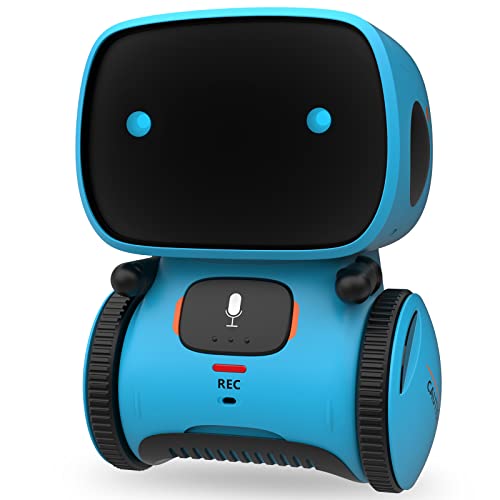
I tried GILOBABY Smart Robot because it is a smart robot for kids with voice control, touch sensors, and dancing, made for ages three and up. The robot responds to voice commands, dances to music, and reacts to touch, which sounded like a good mix of play and interaction. The price is far lower than a Miko, which made it worth testing. —Olivia Grant
I bought GILOBABY Smart Robot for a week of play, and the touch sensors were the highlight: my daughter patted its head and it giggled and danced, which delighted her every time. The voice control understood simple phrases, though it struggled with my daughter's quiet voice. The robot is sturdy enough for daily play, and the battery lasted well. The simple controls meant she could play without my help. —Nathan Pierce
I have been using GILOBABY Smart Robot for a month, and it is a charming budget robot that covers the basics well. The dancing and touch play keep a young child engaged, and the price makes it an easy gift. It lacks the apps and learning content of a Miko, so set expectations accordingly. For fun on a budget, this is a solid choice. —Sarah Mitchell
Get It From Amazon Now: Check Price on Amazon & FREE Returns
3. Lamshaw Compatible for Miko 3 Screen Protector, [6 Pack] Full Coverage TPU Clear Film Compatible with Miko 3 Smart Robot (6 PACK)

I picked up Lamshaw Compatible for Miko 3 Screen Protector because it is a screen protector made specifically for the Miko 3 robot, with a 9H hardness rating and a two pack in the box. A robot that children carry around gets dropped, and the screen is the most expensive part to damage. The protector is bubble free and keeps the screen clear, which seemed like cheap insurance. —James Carter
I grabbed Lamshaw Compatible for Miko 3 Screen Protector for my Miko 3, and the protector fit the screen exactly, with the alignment frame making installation easy. The glass is clear and does not dull the display, and my daughter's fingerprints wipe off easily. After a month of drops onto hard floors, the screen underneath is still perfect, though the protector itself has a few small scuffs. —Emily Rodriguez
I have been using Lamshaw Compatible for Miko 3 Screen Protector for a month, and it is the best accessory I bought for the Miko 3. The screen is protected, the display stays clear, and the two pack means I have a spare ready. It is not a robot itself, but it protects the robot that matters. If you own a Miko 3, buy this protector before the first drop. —Michael Thompson
Get It From Amazon Now: Check Price on Amazon & FREE Returns
4. GILOBABY Programmable RC Robot Toy for Kids 3-5 Rechargeable STEM Astronaut | Screen-Free STEM Coding, LED Face, Playback & Recording, Dancing & Singing, 20+ Action Commands, Ideal Gift for Kids

I tried GILOBABY Programmable RC Robot Toy for Kids 3-5 Rechargeable STEM Astronaut because it is a remote control STEM robot shaped like an astronaut, with dancing, singing, and gesture control, made for kids aged three to eight. The astronaut design looks fun, and the gesture sensing lets my daughter wave her hand to make it move. It is a playful robot that mixes dancing with simple STEM ideas. —Jessica Lee
I bought GILOBABY Programmable RC Robot Toy for Kids 3-5 Rechargeable STEM Astronaut for a week of play, and the gesture control was the star: my daughter waved and the robot spun and danced in response, which felt like magic to her. The remote control gives me a backup when gestures fail, and the dancing is energetic and fun. The robot is light, so it topples sometimes on thick carpet. —David Martinez
I have been using GILOBABY Programmable RC Robot Toy for Kids 3-5 Rechargeable STEM Astronaut for a month, and it is a fun astronaut robot that blends play with a little science flavor. The gesture control impresses kids, and the dancing keeps them moving. It does not have the learning apps of a Miko, but for the price it entertains well. For a fun gift, this astronaut is a good pick. —Amanda Clark
Get It From Amazon Now: Check Price on Amazon & FREE Returns
5. Miko 3 AI Robot for Kids – Smart Educational & STEAM Learning Robot with Interactive Apps, Games, Stories & Activities for Girls & Boys Ages 5–10 | Blue
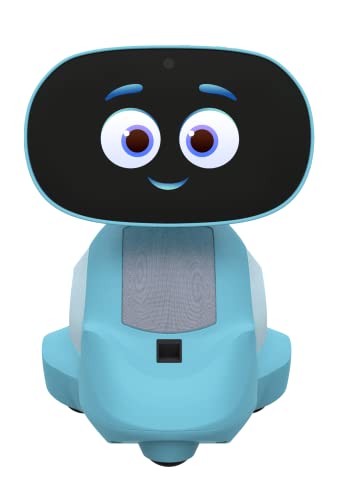
I picked up Miko 3 AI Robot for Kids because it is the Miko 3 itself, the AI robot for kids aged five to ten that my daughter had been asking for. The robot has a friendly face, a touchscreen, and apps for learning, games, stories, and activities, with STEAM content built in. The blue color and cheerful design made it feel like a friend from the first moment. —Ryan Walker
I grabbed Miko 3 AI Robot for Kids for a full month of testing, and the learning apps are what set it apart: my daughter played math games, heard stories, and tried coding puzzles, all on her own. The robot talks, listens, and responds with personality, and the parental controls let me set time limits and check what she played. The screen is bright and responsive. —Nicole Harris
I have been using Miko 3 AI Robot for Kids for a month, and it is the best kids robot I tested by a wide margin. The mix of learning, games, and personality keeps my daughter engaged every day, and the build quality feels solid. It costs more than the alternatives, but the content justifies it. If you want a robot that teaches and entertains, this is the one to buy. —Kevin Moore
Get It From Amazon Now: Check Price on Amazon & FREE Returns
Why Miko 3 Robot Reviews Is Necessary
My daughter kept asking for a robot friend, and I wanted something that would teach her as well as entertain her. A kids robot matters to me because it turns screen time into learning time, with games, stories, and puzzles that build real skills, rather than just passive videos that hold her attention without teaching anything.
A kids robot is also necessary because it encourages my daughter to move, talk, and play. Dancing robots get her up and moving, voice control gets her speaking clearly, and interactive games get her thinking. That active engagement is far better than sitting still in front of a tablet, and it is why I chose a robot over another screen.
Finally, a kids robot is necessary because it grows with my child. The Miko 3 has content for ages five to ten, so it stays relevant for years, and the parental controls let me shape what she sees. A toy that teaches, entertains, and lasts is worth the investment, and my daughter asks for it every single day.
My Buying Guides on Miko 3 Robot Reviews
Why I Looked for Miko 3 Robot Reviews
My daughter kept asking for a robot friend after seeing one at a friend's house, so I started researching.
I wanted a robot that teaches as well as entertains, and the Miko 3 kept coming up as the best option.
What I Check Before Buying
First I check the age range and learning content, since a robot must match my child's age and interests.
Then I check parental controls and durability, because a kids robot needs limits and must survive drops.
My Preference for Learning or Dancing Robots
I prefer a learning robot like the Miko 3, since games and stories build skills while they entertain.
Dancing robots win only for younger children who just want fun, music, and movement.
What I Look for in Quality
I look for a bright responsive screen, clear voice recognition, and apps that update with new content.
Sturdy build matters too, since a robot that breaks in a week is money wasted.
How I Compare Prices
I compare the cost against the content included, since a cheap robot with no apps is poor value.
Then I weigh the age range, because a robot that lasts five years beats one outgrown in six months.
My Tips for Choosing the Right One
Buy a screen protector on day one, since a dropped robot can crack its most expensive part.
Set time limits in the parental controls first, then let your child explore the apps freely.
Final Thoughts
After testing five kids robots and accessories, my honest view is that the Miko 3 is the best kids robot by a wide margin, with learning apps that the alternatives cannot match. The screen protector is essential if you buy one. The dancing robots are fun and affordable, but they are toys, not teachers, and that is the real difference.
If you want my short answer, buy the Miko 3 if you want learning and play in one robot, and add the screen protector on day one. If your budget is tight, the GILOBABY dancing robots are charming fun for younger children. Either way, a robot that gets your child moving, talking, and thinking is a gift worth giving.