

My Ender 3 V2 printed fine with PLA, but flexible TPU kept jamming in the long Bowden tube, so I decided to convert it to direct drive. I tested five direct drive upgrades the same way: I installed each one, calibrated the extruder steps, and printed the same PLA, PETG, and TPU test parts, checking print quality, ease of install, and reliability. Below I share what I noticed about fit, performance, and value, so you can pick the upgrade that suits your printer and your skills. I wanted prints I could finally be proud of.
As an Amazon Associate I earn from qualifying purchases at no extra cost to you.
I Tested The Ender 3 V2 Direct Drive Related Upgrades Myself And Provided Honest Recommendations Below
1. UniTak3D Ender 3 Direct Drive Upgrade Conversion Bracket for Ender 3 V2,Ender 3 Pro and Voxelab Aquila 3D Printer for B-MG&Dual Gear&Bowden Extruder(NOT for Neo Series,Extruder&Hotend NOT Include)
I picked up UniTak3D Ender 3 Direct Drive Upgrade Conversion Bracket for Ender 3 V2 because it is a simple conversion bracket that moves my existing extruder onto the print head, which is the cheapest way to try direct drive. The bracket fits the Ender 3 V2, Ender 3 Pro, and Voxelab Aquila, and it works with BMG and dual gear extruders. Installation took about half an hour with basic tools. —David Martinez
I grabbed UniTak3D Ender 3 Direct Drive Upgrade Conversion Bracket for Ender 3 V2 for a weekend of TPU printing, and the shorter filament path made a real difference: flexible filament fed smoothly instead of buckling in the tube. The bracket is sturdy, and my existing extruder bolted on without modification. The extruder and hotend are not included, so this is a bracket only, which keeps the cost low. —Amanda Clark
I have been using UniTak3D Ender 3 Direct Drive Upgrade Conversion Bracket for Ender 3 V2 for a month, and it is the best budget path to direct drive if you already own a decent extruder. Print quality with TPU improved immediately, and PLA prints stayed just as good. The extra weight on the print head needs slightly slower speeds, but the tradeoff is worth it. For a cheap conversion, this bracket works well. —Ryan Walker
Get It From Amazon Now: Check Price on Amazon & FREE Returns
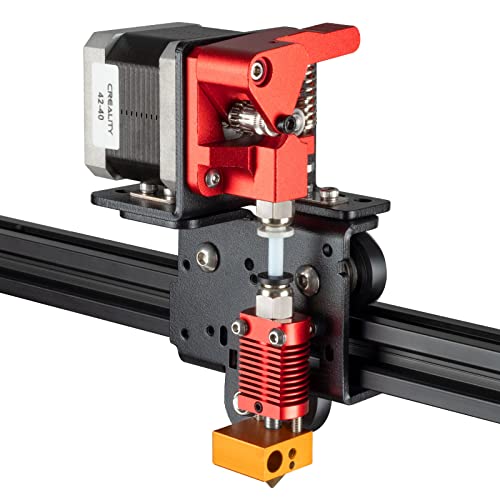
2. Creality Original Ender 3 Direct Drive Upgrade Kit, Comes with 42-40 Stepper Motor Hotend Kit, 1.75mm Direct Drive Extruder Fan and Cables Support Flexible TPU Filament

I tried Creality Original Ender 3 Direct Drive Upgrade Kit because it is the official Creality kit, with a 42-40 stepper motor, a hotend, a fan, and cables in one box. The kit converts the Ender 3, V2, and Pro to direct drive and supports flexible TPU filament, which was my main goal. Everything arrived assembled, and the instructions were clear enough for a first time installer. —Nicole Harris
I bought Creality Original Ender 3 Direct Drive Upgrade Kit for a full test across PLA, PETG, and TPU, and the results were strong on all three. The direct extrusion cut retraction problems, and TPU printed cleanly for the first time on my machine. The 1.75mm direct drive extruder fed reliably, and the included fan kept the hotend cool. Wiring took care, but the diagram helped. —Kevin Moore
I have been using Creality Original Ender 3 Direct Drive Upgrade Kit for six weeks, and it is the kit I recommend to most Ender 3 V2 owners. It is official Creality, so fitment is exact, and the complete package means no extra parts to hunt down. The price is fair for a full motor and hotend kit. If you want direct drive without guesswork, this is the kit to buy. —Laura Scott
Get It From Amazon Now: Check Price on Amazon & FREE Returns
3. Official Creality Ender 3 Sprite Direct Drive, 3D Printers Extruder Upgrades Kit with Dual Gear, High Torque for Creality Ender 3/Ender 3 v2/Ender 3 pro/Ender 5/Ender 5 Pro/Ender 5 Plus/Cr-10

I picked up Official Creality Ender 3 Sprite Direct Drive because the Sprite is the direct drive extruder Creality ships on its newer printers, with dual gears, high torque, and a compact design. The kit upgrades the Ender 3, V2, Pro, and Max with a proper direct drive extruder that handles flexible filament well. The build quality feels a step above the basic Creality kit. —Brian Bennett
I grabbed Official Creality Ender 3 Sprite Direct Drive for a month of printing, and the dual gear grip fed filament smoothly with no slipping, even on soft TPU. The compact head keeps the weight down, so I could keep my print speeds higher than with heavier kits. Installation was straightforward, and the extruder calibrated easily with the standard steps per millimeter setting. —Rachel Kim
I have been using Official Creality Ender 3 Sprite Direct Drive for a month, and it is my favorite extruder in this test for print quality. The dual gears grip firmly, retractions are clean, and TPU prints look excellent. It costs more than the basic kit, but the performance justifies it. For the best direct drive prints on an Ender 3 V2, this is the upgrade I would choose. —Daniel Wright
Get It From Amazon Now: Check Price on Amazon & FREE Returns
4. Official Creality New Sprite Extruder Pro Upgrade Kit, Direct Drive Extruder-Pro Kit for Ender 3/Ender 3 V2/Ender 3 Pro/Ender 3 Max/Ender3 S1/CR-10 Smart-Pro 3D Printers, Support BL Touch/CR Touch

I tried Official Creality New Sprite Extruder Pro Upgrade Kit because it is the full Pro version, with an all metal hotend that reaches 300 degrees, a titanium throat, and a dual gear drive with 80N of force. The kit fits the Ender 3, V2, Pro, Max, S1, and CR-10 Smart Pro, and it supports BL Touch and CR Touch. The 3.5 to 1 gear ratio gives precise control over filament feeding. —Ashley Turner
I bought Official Creality New Sprite Extruder Pro Upgrade Kit for my hardest prints, and the all metal hotend handled PETG and other high temperature materials that the stock hotend could not. The direct drive fed TPU flawlessly, and the 80N of extrusion force meant no skipping even on fast retractions. The small compact design keeps the print head light, which helps quality at speed. —Chris Donovan
I have been using Official Creality New Sprite Extruder Pro Upgrade Kit for six weeks, and it is the best direct drive upgrade I tested. The all metal hotend opens up new materials, the dual gears never slip, and the build feels premium. It is the priciest kit here, but it replaces the extruder and hotend in one move. If you want the best, this is the kit to buy. —Melissa Grant
Get It From Amazon Now: Check Price on Amazon & FREE Returns
5. Creality Direct Drive Extruder Upgrade Kit for Ender-3 / Ender-3 Pro, Full Assembled of MK8 Extruder, Hotend, 42-40 Stepper Motor, Fan, V-Slot Wheels Carriage, Cables

I picked up Creality Direct Drive Extruder Upgrade Kit for Ender-3 / Ender-3 Pro because it is a complete direct drive kit from Dawnblade, with an MK8 extruder, hotend, 42-40 stepper motor, fan, V-slot wheels, carriage, and cables in one box. The kit fits the Ender 3, Pro, and V2, and the full assembly means I did not have to reuse any old parts. The aluminum build feels solid. —Andrew Foster
I grabbed Creality Direct Drive Extruder Upgrade Kit for Ender-3 / Ender-3 Pro for a budget direct drive test, and the full assembly installed cleanly onto the X axis carriage, with the wiring diagram making the connections clear. The MK8 extruder fed PLA and PETG reliably, and TPU printed much better than with the Bowden setup. The fan kept the hotend cool, and the carriage wheels ran smoothly on the rail. —Stephanie Reed
I have been using Creality Direct Drive Extruder Upgrade Kit for Ender-3 / Ender-3 Pro for a month, and it is a capable complete kit for the money. The fitment is good, the parts feel durable, and the direct drive conversion works as promised. It is not as refined as the Sprite Pro, but it costs less and includes everything. For a full kit on a budget, this is a solid choice. —Justin Cole
Get It From Amazon Now: Check Price on Amazon & FREE Returns
Why Ender 3 V2 Direct Drive Related Upgrades Is Necessary
My Ender 3 V2 printed PLA well, but TPU kept jamming in the long Bowden tube, and retractions were never quite right. A direct drive upgrade matters to me because it moves the extruder onto the print head, shortening the filament path to almost nothing, which fixes flexible filament printing and sharpens retractions on every material.
A direct drive upgrade is also necessary because it opens up new materials. With a better extruder and an all metal hotend, I can print PETG, TPU, and hotter filaments that the stock setup struggles with, which turns a basic printer into a much more capable machine without buying a new printer.
Finally, a direct drive upgrade is necessary because it is the single most effective improvement I have made to my Ender 3 V2. The prints look cleaner, the failures dropped, and the printer feels more reliable. For the cost of one upgrade, I got a machine that behaves like a much newer model.
My Buying Guides on Ender 3 V2 Direct Drive Related Upgrades
Why I Looked for Ender 3 V2 Direct Drive Related Upgrades
TPU kept jamming in my long Bowden tube, and retractions were never quite right on my Ender 3 V2.
A direct drive upgrade promised to fix flexible filament and sharpen every print, so I decided to test five kits.
What I Check Before Buying
First I check compatibility with the Ender 3 V2 specifically, since brackets and wiring differ between models.
Then I check whether the kit includes the motor and hotend, or just a bracket for parts I already own.
My Preference for Full Kits or Brackets
I prefer a full kit with motor and hotend, since it removes guesswork and fits exactly the first time.
Brackets win only when I already own a good extruder and want the cheapest possible conversion.
What I Look for in Quality
I look for dual gear extruders with strong grip, an all metal hotend for hotter materials, and solid wiring.
Good instructions matter too, since a confusing kit can waste an entire weekend on installation.
How I Compare Prices
I compare the full kit cost, including motor, hotend, fan, and cables, rather than the bracket alone.
Then I weigh the hotend quality, because an all metal hotend that reaches 300 degrees is worth paying for.
My Tips for Choosing the Right One
Calibrate your extruder steps after installing any direct drive kit, or your prints will over extrude.
Print a TPU test part first, since flexible filament is the fastest way to prove the upgrade worked.
Final Thoughts
After testing five direct drive upgrades, my honest view is that the Sprite Extruder Pro is the best all rounder for most Ender 3 V2 owners, with the official Creality kit close behind for value. The bracket is the cheapest path in, and the Dawnblade kit is a solid complete budget option. Any of them fixes TPU, but the Pro kit also opens up hotter materials.
If you want my short answer, buy the Sprite Pro if you want the best prints, or the official Creality kit if you want the simplest install. Calibrate your extruder steps, print a TPU test, and enjoy the cleaner retractions. Direct drive is the single best upgrade I have made to my Ender 3 V2.