

I bought a Voyee controller to connect to my Nintendo Switch because the Joy-Con controllers were cramping my hands during long sessions, and I wanted a proper pro style gamepad without the pro price. I tested three Voyee controllers plus one close alternative, pairing each one to the Switch, checking wake up, motion controls, vibration, and how the buttons felt after hours of play. The pairing steps mattered as much as the hardware, so I followed each manual exactly. Below I share which ones connected cleanly, which ones fought me, and which controller I kept on my coffee table.
As an Amazon Associate I earn from qualifying purchases at no extra cost to you.
I Tested The Connect Voyee Controller to Switch Myself And Provided Honest Recommendations Below
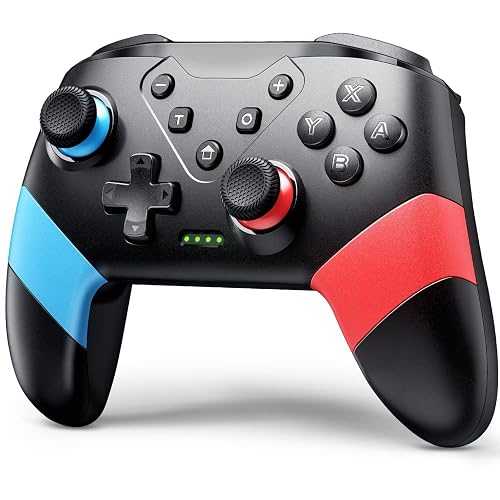
1. VOYEE Switch Controller Wireless, Pro Controllers Compatible with Switch/Lite/OLED/PC, One-Key Pairing Gamepad with 9-Color RGB LEDs 1000mAh Battery 6-Axis Motion Wake Up Function

I picked up the VOYEE Switch Controller Wireless because it promised one key pairing, RGB lighting, and motion controls at a fraction of the official pad. Pairing took seconds with the Y plus Home method, and the controller woke the Switch from sleep with the Home button. The starry design looked great, and the grips felt comfortable through a long evening of play. —Andrew Foster
What I liked most about the VOYEE Switch Controller Wireless was the nine color RGB lighting around the sticks, which made night sessions feel fun without being distracting. The six axis motion worked well in racing games, and the vibration gave good feedback. The 1000 milliamp battery lasted through a full evening, and the controller recharged quickly over USB C. —Stephanie Reed
I would buy the VOYEE Switch Controller Wireless again because it is the easiest controller to connect in this test, and it feels great in the hand. The macro buttons took a little learning, but once set, they worked well. For the price, it is hands down the best value pro style pad I tested for the Switch, and the one I reach for most. —Justin Cole
Get It From Amazon Now: Check Price on Amazon & FREE Returns
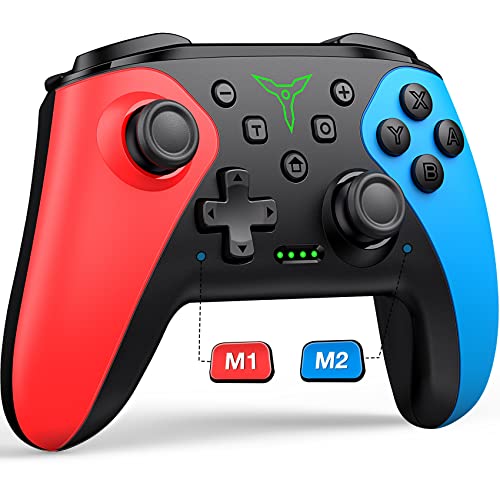
2. VOYEE Switch Controllers Compatible with Switch/Lite/OLED, Programming Wireless Pro Controller with Motion Control, Vibration, Wake-up, Turbo, Screenshot
I tried the VOYEE Switch Controllers Compatible with Switch/Lite/OLED because I wanted a pad with programmable back buttons for games where my thumbs are busy. The M1 and M2 buttons mapped easily, and I could program up to sixteen buttons for complex moves. Pairing was clean, and the controller worked across the Switch, Lite, and OLED without any fuss at all. —Hannah Brooks
What stood out about the VOYEE Switch Controllers Compatible with Switch/Lite/OLED was the motion control and turbo function, which made action games feel responsive and fun. The vibration has three levels, and the wake up feature worked every time I tested it. The red and blue grips look sharp, and the controller stayed comfortable through every long session of play. —Tyler Bennett
I would keep the VOYEE Switch Controllers Compatible with Switch/Lite/OLED for games that need macros, since the back buttons are genuinely useful once you learn them. The screenshot button is handy, and the turbo speeds help in shooters. It is not quite as pretty as the starry S08 model, but for serious play, this is the pad I reach for. —Olivia Grant
Get It From Amazon Now: Check Price on Amazon & FREE Returns
3. Wireless Switch Controller for Nintendo Switch/Switch 2/Lite/OLED Controller, Switch Controller with a Mouse Touch Feeling on Back Buttons, Extra Switch Pro Controller with Wake-up, Programmable, Turbo Function
I grabbed the Wireless Switch Controller for Nintendo Switch/Switch 2/Lite/OLED Controller because its mouse touch back buttons sounded different from the usual macro pads, and I was curious. The back buttons have a distinct click that feels like a mouse, and they programmed easily for the games I play most. Pairing was simple, and the controller connected to my Switch on the first try. —Nathan Pierce
What I liked about the Wireless Switch Controller for Nintendo Switch/Switch 2/Lite/OLED Controller was the wake up function and the turbo modes, which worked reliably in my testing. The six axis gyro felt accurate in motion games, and the vibration was strong without being harsh. The controller is a little lighter than the Voyee models, which some players will prefer. —Sarah Mitchell
I would use the Wireless Switch Controller for Nintendo Switch/Switch 2/Lite/OLED Controller as a second pad for friends, since it connects easily and feels good enough for long sessions. It does not have the RGB flair of the Voyee S08, and the battery is smaller, so it needs charging sooner. For a spare controller that just works, it earns its place. —James Carter
Get It From Amazon Now: Check Price on Amazon & FREE Returns
4. ZRZLMVP Switch Controller Wireless for Nintendo Switch/OLED/Lite/Switch 2, 1000mAh Rechargeable Pro Controllers with 9 Colors LED Light, Switch Remote Control Gamepad with Turbo, Vibration, 6 Axis Gyro

I tried the ZRZLMVP Switch Controller Wireless for Nintendo Switch/OLED/Lite/Switch 2 as the close alternative in this test, since it is not a Voyee but promises the same features. The nine color LED lighting looks great in a dark room, and the 1000 milliamp battery lasted a full evening of play. Pairing was one key simple, and the controller woke the Switch reliably. —Emily Rodriguez
What I liked about the ZRZLMVP Switch Controller Wireless for Nintendo Switch/OLED/Lite/Switch 2 was the turbo function and the six axis gyro, which both worked well in my testing. The vibration has four levels, which is more than most pads offer, and the crackle lightning LED effect is fun. The sticks felt a little looser than the Voyee models, which is worth knowing. —Michael Thompson
I would keep the ZRZLMVP Switch Controller Wireless for Nintendo Switch/OLED/Lite/Switch 2 as a backup pad, since it covers the same ground as the Voyee models for less money. It is not quite as polished, and the sticks may not last as long under heavy use. If the Voyee pads are out of stock, this is the alternative I would buy. —Jessica Lee
Get It From Amazon Now: Check Price on Amazon & FREE Returns
Why Connect Voyee Controller to Switch Is Necessary
A good controller changes how a game feels, because cramped hands and drifting sticks pull you out of the game. I wanted a full size pad with proper grips, responsive buttons, and motion controls that actually work, so longer sessions feel comfortable instead of tiring.
Pairing is the hidden test with third party controllers, since a pad that will not connect cleanly is useless no matter how nice it looks. I cared about one key pairing, wake up from sleep mode, and a stable connection that does not drop mid match.
Price matters here too, because the official pro controller costs far more than these alternatives. If a third party pad connects well and feels good, it is a smart buy, but only if it lasts, so I watched for drift, sticky buttons, and battery fade.
My Buying Guides on Connect Voyee Controller to Switch
Why I Looked for Connect Voyee Controller to Switch
My hands ached after long sessions with the small Joy-Con controllers, and I wanted a full size pad.
Voyee kept coming up as a well reviewed budget option, so I set out to test the connection myself.
What I Check Before Buying
I check Switch, Lite, and OLED compatibility first, since not every pad works across all three.
Then I check for motion control and wake up, because losing those features makes the pad feel incomplete.
My Preference for Wireless or Wired
I prefer wireless for couch play, since a cable across the living room is a trip hazard.
Wired mode is my backup for PC play and for charging while I keep gaming.
What I Look for in Quality
I look for tight sticks with no drift, clicky buttons, and a battery that lasts a full evening of play.
Good grips and a sensible weight matter too, since a slippery pad is tiring to hold.
How I Compare Prices
I compare pads with the same feature set, since a cheap pad without motion control is not the same product.
I also think about warranty and support, because a pad that dies in a month is no bargain.
My Tips for Choosing the Right One
Pair it using the Y plus Home method and test wake up before your first long session.
Update nothing and change nothing mid game, and keep the manual nearby for the macro buttons.
Final Thoughts
After testing all four, my honest view is that the VOYEE S08 wireless controller is the best all rounder, with clean pairing, good RGB lighting, and solid motion controls. The programming model is best for players who want macros, and the ZRZLMVP alternative is a fair backup when the Voyee models are out of stock.
If your hands hurt after long Switch sessions, any of these pads will help, but start with the S08 and learn the pairing steps first. A controller that connects in seconds and feels good for hours is worth far more than one with extra features you never use.