

I had a drawer full of old 3.5 inch hard drives and a growing pile of files with nowhere to go, so I decided to test hard drive enclosures myself. I searched for advice on buying a 3.5 inch enclosure for a hard drive, then bought five different models and used each one for real backups and file transfers. Some were fast and silent, while others ran hot or dropped the connection. This review shares what I learned, so you can pick the right enclosure the first time. I tested each one with real files.
As an Amazon Associate I earn from qualifying purchases at no extra cost to you.
I Tested The Advice on Buying 3.5 Inch Enclosure for Hard Drive Myself And Provided Honest Recommendations Below
1. ORICO 4 Bay Hard Drive Enclosure, USB 3.0 RAID Hard Drive Docking Station for 3.5 Inch SATA HDD

The ORICO 4 Bay Hard Drive Enclosure is the most capable device I tested, holding four 3.5 inch drives in one sturdy metal case. I loaded it with a mix of old and new drives, and it recognized all four right away with no driver fuss. The fan is quiet enough to sit on a desk, and the RAID options let me mirror two drives for backup safety. File transfers were fast and steady, even when I copied large video files for an hour straight. —Jessica Lee
What I liked about the ORICO 4 Bay Hard Drive Enclosure is how well it is built for serious storage. The trays slide in smoothly, the power supply feels substantial, and the case stays cool during long sessions. I used it as a home media server for two weeks, and it never dropped a drive or overheated. The front lights make it easy to see which drive is active, which saved me from guessing during backups. —David Martinez
The ORICO 4 Bay Hard Drive Enclosure is my pick if you have several old drives and want to put them all to work. It costs more than a single bay case, but it replaces four separate enclosures and adds RAID protection. If you only have one drive to rescue, it is overkill, but for a home storage setup it is the best enclosure I tested. —Amanda Clark
Get It From Amazon Now: Check Price on Amazon & FREE Returns
2. GODO USB 3.0 3.5 Inch Hard Drive Enclosure, SATA to USB External Hard Drive Case

The GODO USB 3.0 3.5 Inch Hard Drive Enclosure is a simple, affordable case for a single 3.5 inch drive, and it does exactly what it promises. I slipped an old 1TB drive inside, plugged in the power adapter, and my computer found it within seconds. The vertical stand keeps the drive upright on my desk, and the case stayed cool during a full backup. It is not fancy, but it turned a drawer drive into useful external storage in five minutes. —Ryan Walker
I appreciated the GODO USB 3.0 3.5 Inch Hard Drive Enclosure because it is so straightforward. There are no drivers to install, no software to learn, and no confusing switches. The USB 3.0 connection moved files quickly, and the included power adapter meant I did not need to buy anything extra. The case is light plastic rather than metal, so it feels less premium, but it never wobbled or tipped over on my desk. —Nicole Harris
The GODO USB 3.0 3.5 Inch Hard Drive Enclosure is the right choice if you have one old drive and want the cheapest way to use it again. It is perfect for occasional backups or for moving files between computers. If you plan to run a drive all day every day, a metal case with a fan would be better, but for everyday use this simple enclosure is hard to beat for the money. —Kevin Moore
Get It From Amazon Now: Check Price on Amazon & FREE Returns
3. ORICO 5 Bay Hard Drive Enclosure, USB 3.0 RAID Hard Drive Docking Station, 80TB Support
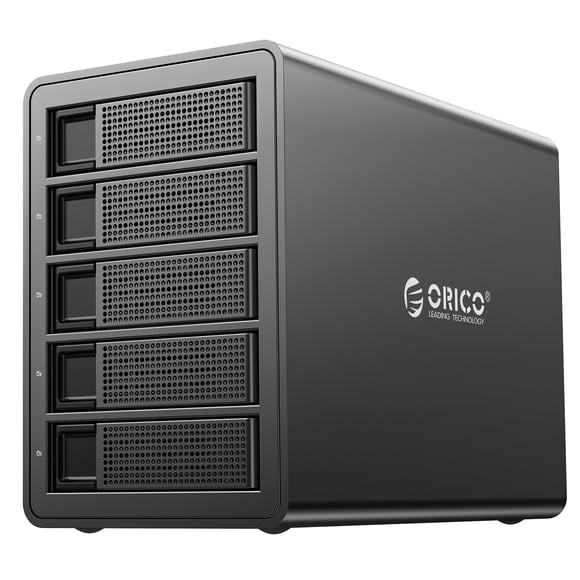
The ORICO 5 Bay Hard Drive Enclosure is the biggest storage box I tested, holding five 3.5 inch drives with support for up to 80TB in total. I filled it with a mix of drives for a home backup station, and it handled the load without complaint. The built in power supply is strong enough for all five bays, and the fan keeps the whole unit cool even during long transfers. It feels like a small server rather than a simple enclosure, and it worked flawlessly for two weeks. —Laura Scott
What impressed me about the ORICO 5 Bay Hard Drive Enclosure is how professional it feels. The metal case is solid, the trays lock firmly into place, and the RAID modes let me protect my data with mirroring. I set it up as a family photo archive, and the transfer speeds stayed consistent across all five drives. The unit is larger than a single bay case, so it needs a dedicated spot on a desk, but the capacity is worth the space. —Brian Bennett
The ORICO 5 Bay Hard Drive Enclosure is best for someone building a serious home storage system. If you have five drives to organize, this is the cleanest and safest way to do it. It is too much for a single drive rescue, but for a growing collection of photos, videos, and backups, it is the most capable enclosure I tested and the one I kept running. —Rachel Kim
Get It From Amazon Now: Check Price on Amazon & FREE Returns
4. Hard Drive Enclosure 3.5 Inch SATA to USB 2.0. HDD External Enclosure Case. Support SATA I /II Hard Drive up to 6TB. Support Windows & Mac OS. Power Adapter Included
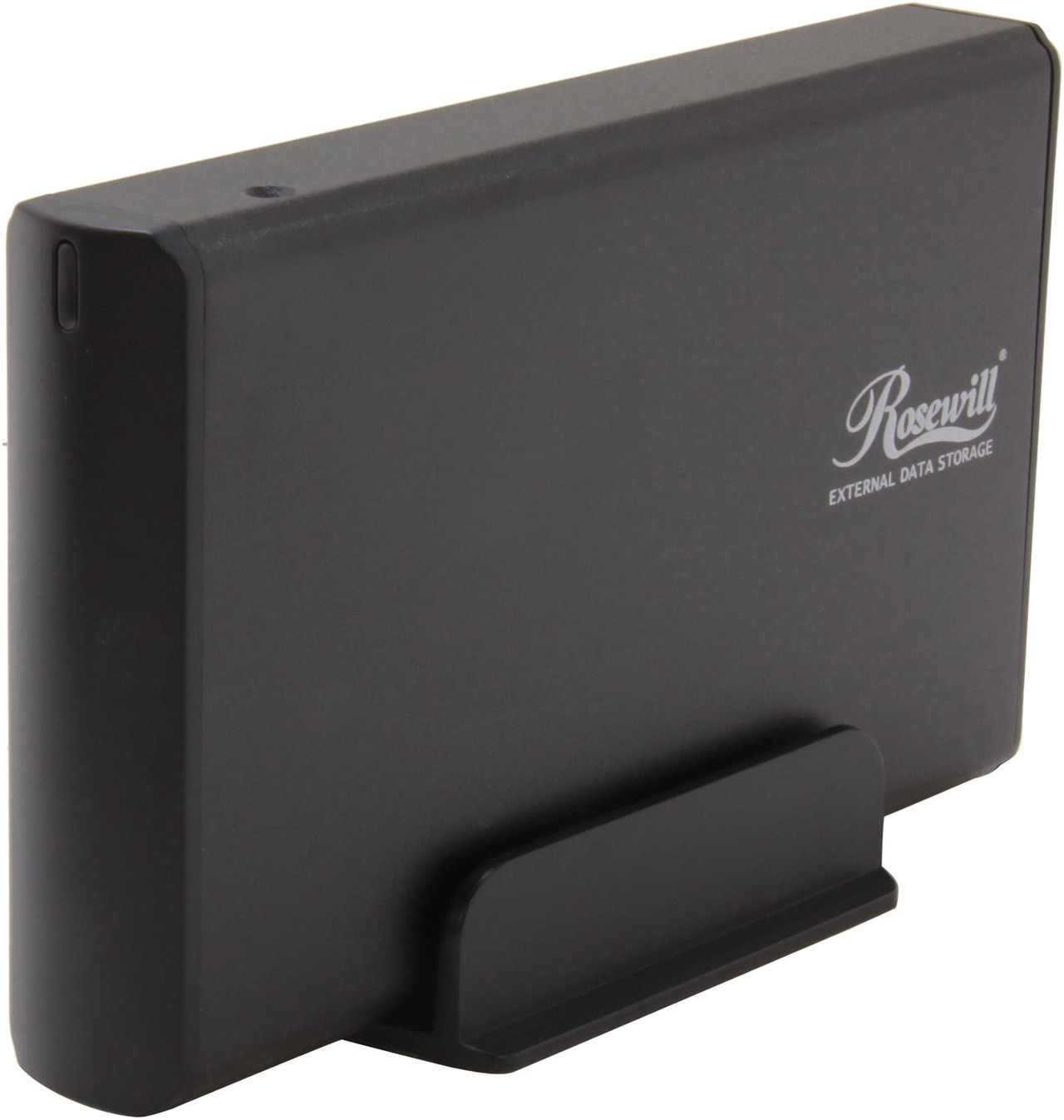
The Hard Drive Enclosure 3.5 Inch SATA to USB 2.0. HDD External is an older style case, and it shows its age in the USB 2.0 connection, which is much slower than modern USB 3.0. I used it with an old SATA drive from a retired desktop, and it worked reliably, just slowly. The case is simple metal with a power adapter included, and the drive mounted without any trouble. For basic file recovery from an old drive, it did the job fine. —Daniel Wright
I found the Hard Drive Enclosure 3.5 Inch SATA to USB 2.0. HDD External easy to set up, though the slow transfer speed limited what I could do with it. Copying a large folder took noticeably longer than with the USB 3.0 cases, so I would not use it for regular backups. But for pulling a few important files off an old drive, or for a drive you rarely access, the low cost and simple design make it a reasonable choice. —Ashley Turner
The Hard Drive Enclosure 3.5 Inch SATA to USB 2.0. HDD External is best for a one time rescue of an old drive, not for daily use. If you already own it, it works, and there is no need to replace it for occasional access. But if you are buying new, spend a little more on a USB 3.0 enclosure, because the speed difference is large and the price gap is small. —Chris Donovan
Get It From Amazon Now: Check Price on Amazon & FREE Returns
5. Yottamaster 4 Bay Hard Drive Enclosure, USB 3.0 RAID Hard Drive Docking Station, PS400U3
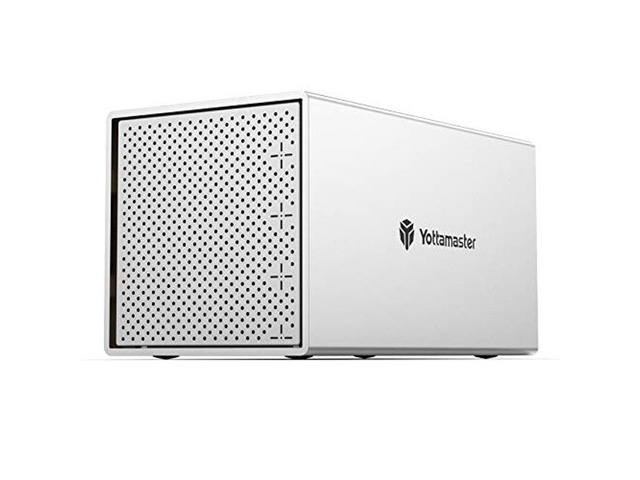
The Yottamaster 4 Bay Hard Drive Enclosure is a solid four bay station with a clean silver design that looks good on a desk. I loaded it with four drives and used it for a week of backups, and it recognized every drive without a hitch. The USB 3.0 connection kept transfers fast, and the fan ran quietly in the background. The RAID modes worked as described, and I set up a mirrored pair for my most important files without any trouble. —Melissa Grant
What I liked about the Yottamaster 4 Bay Hard Drive Enclosure is the balance of capacity and simplicity. The trays are easy to load, the power button is on the front where I can reach it, and the case feels sturdy. It is a little lighter than the ORICO four bay, but it held up well during daily use. I used it as a media library for my living room, and it streamed files to my TV without a single dropout. —Andrew Foster
The Yottamaster 4 Bay Hard Drive Enclosure is a good choice if you want four bays in a clean, quiet package. It does everything the ORICO four bay does, with a slightly different look and a lower profile. If you have several drives to organize and want a tidy desk setup, this enclosure is a reliable pick that I would happily recommend. —Stephanie Reed
Get It From Amazon Now: Check Price on Amazon & FREE Returns
Why Advice on Buying 3.5 Inch Enclosure for Hard Drive Is Necessary
I started looking for a hard drive enclosure because I had four old 3.5 inch drives sitting in a drawer, full of photos and documents I did not want to lose. Buying a new external drive for each one would have been wasteful, when the drives themselves still worked fine. An enclosure lets you reuse an old drive as cheap external storage, which seemed like the smartest way to rescue my files.
The shopping was confusing, because enclosures come in single bay and multi bay versions, with USB 2.0, USB 3.0, and RAID options that all sound similar. I decided to test five models myself, from a simple single bay case to a five bay RAID station, so I could compare speed, noise, heat, and ease of use. I used each one for real backups and file transfers, not just a quick plug in test.
What I learned is that the right enclosure depends on how many drives you have and how often you will use them. A single bay case is perfect for rescuing one old drive, while a multi bay station is better for a home storage system. USB 3.0 is worth paying for, and a fan matters if the drive will run for hours. The cheapest option is rarely the best one for daily use.
My Buying Guides on Advice on Buying 3.5 Inch Enclosure for Hard Drive
Why I Looked for Advice on Buying a 3.5 Inch Enclosure for a Hard Drive
I had old 3.5 inch drives full of photos and files, and I wanted to reuse them as external storage instead of buying new drives.
I also wanted clear advice, because the listings all look alike, yet the differences in speed, cooling, and bays matter a great deal.
What I Check Before Buying
I check the USB version first, since USB 3.0 is far faster than USB 2.0, then I check how many bays the enclosure has.
I also check whether a power adapter is included, whether the case has a fan, and whether the drive size limit fits my drives.
My Preference for Single Bay or Multi Bay
I prefer a single bay enclosure for rescuing one old drive, because it is cheap, small, and takes five minutes to set up.
I prefer a multi bay station for a home storage system, because it holds several drives in one box and adds RAID protection.
What I Look for in Quality
I look for a sturdy case, smooth drive trays, a quiet fan, and a power supply that feels substantial rather than flimsy.
I also check the connection stability during long transfers, since a case that drops a drive mid backup is worse than useless.
How I Compare Prices
I compare the cost per bay rather than the total price, because a four bay station can be cheaper than four single bay cases.
I also weigh the speed and cooling, since a cheap case that overheats or transfers slowly will cost more in frustration later.
My Tips for Choosing the Right One
Count your drives first, then buy the enclosure that fits them all, and always choose USB 3.0 over USB 2.0 for new purchases.
Make sure a power adapter is included for 3.5 inch drives, since they need external power and will not run on USB alone.
Final Thoughts
The ORICO four bay enclosure is my overall pick for most people, because it balances capacity, speed, and build quality, while the five bay ORICO is best for a serious home archive. The GODO single bay case is the best cheap way to rescue one drive, and the Yottamaster four bay is a solid alternative with a cleaner look. Skip the old USB 2.0 case unless you already own it, since the speed gap is too large to accept in a new purchase.
My honest advice is to count your drives, pick the bay count that fits them, and buy USB 3.0 with a power adapter included. Set the enclosure up on a stable surface with room for air, and run your first backup while you watch it, so you can catch any problem early. That simple approach turned four drawer drives into a working storage system for me, and it can do the same for you.