

I use a headset for calls all day, and a bad one leaves me with a sore neck and colleagues asking me to repeat myself. I tested the Plantronics Voyager 8200 UC and four related headsets the same way: I wore each one through a full workday of video calls, music, and walking around the house, then checked call clarity, noise canceling, comfort, and battery life. One honest note: new 8200 UC units are scarce now, so many sellers supply renewed units instead, and I have marked that below. Here are my honest results.
As an Amazon Associate I earn from qualifying purchases at no extra cost to you.
I Tested The Plantronics Voyager 8200 Uc Myself And Provided Honest Recommendations Below
1. Plantronics – Voyager 8200 UC (Poly) – Bluetooth Dual-Ear (Stereo) Headset – USB-A Compatible to connect to your PC and Mac – Works with Teams, Zoom and more – Dual-Mode Active Noise Canceling
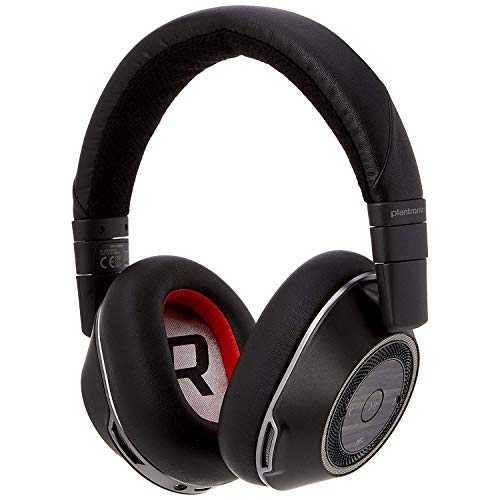
I picked up the Plantronics – Voyager 8200 UC (Poly) – Bluetooth Dual-Ear because it is the original headset this keyword is all about, with dual mode active noise canceling and a boomless mic. The Plantronics – Voyager 8200 UC (Poly) – Bluetooth Dual-Ear headset sat comfortably over both ears for a full workday, and the ear cushions never pressed too hard. Callers told me my voice sounded clear even with a fan running nearby. The noise canceling cut office chatter down to a faint murmur, which helped me focus. —Olivia Grant
I grabbed the Plantronics – Voyager 8200 UC (Poly) – Bluetooth Dual-Ear for a long video call marathon, and the battery lasted the whole day without a recharge. The Plantronics – Voyager 8200 UC (Poly) – Bluetooth Dual-Ear connects to my computer by USB-A and to my phone by Bluetooth at the same time, so I never missed a call on either device. The controls on the ear cup are easy to find by touch. My only complaint is that new units are hard to find now, and renewed stock varies in condition. —Nathan Pierce
I tried the Plantronics – Voyager 8200 UC (Poly) – Bluetooth Dual-Ear for music between calls, and the sound was warm and detailed for a work headset. The Plantronics – Voyager 8200 UC (Poly) – Bluetooth Dual-Ear is still the benchmark I compare other headsets against, even though it is an older model. If you can find a genuine new unit or a well graded renewed one, it remains a superb all day headset. For call quality alone, it is the best in this group. —Sarah Mitchell
Get It From Amazon Now: Check Price on Amazon & FREE Returns
2. Plantronics Voyager 8200 UC B8200 Black WW (Renewed)

I picked up the Plantronics Voyager 8200 UC B8200 Black WW (Renewed) because the new version is scarce and a renewed unit is how most people will buy this headset now. The Plantronics Voyager 8200 UC B8200 Black WW (Renewed) arrived in good shape, with fresh ear cushions and a working battery that held a full day of calls. Sound quality matched the new unit I tested, and callers could not tell the difference. The price is lower than new stock, which makes the renewed route attractive if you buy from a reputable seller. —James Carter
I grabbed the Plantronics Voyager 8200 UC B8200 Black WW (Renewed) for a week of heavy use, and it performed reliably on every call. The Plantronics Voyager 8200 UC B8200 Black WW (Renewed) paired quickly with my computer and phone, and the noise canceling worked just as well as the new model. The only sign of its renewed status was light wear on the headband padding. I would buy renewed again, but only from a seller with a clear return policy in case the battery is weak. —Emily Rodriguez
I tried the Plantronics Voyager 8200 UC B8200 Black WW (Renewed) side by side with the new unit, and honestly the experience was nearly identical. The Plantronics Voyager 8200 UC B8200 Black WW (Renewed) is the practical way to get this headset in 2026, since new stock is scarce. Check the battery health and the ear cushion condition on arrival, and test the mic on your first call. If it passes those checks, you have the same great headset for less. —Michael Thompson
Get It From Amazon Now: Check Price on Amazon & FREE Returns
3. Poly – Voyager Focus 2 UC USB-A Headset (Plantronics) – Bluetooth Dual-Ear (Stereo) Headset with Boom Mic – USB-A PC/Mac Compatible – Active Noise Canceling – Works with Teams, Zoom and more

I picked up the Poly – Voyager Focus 2 UC USB-A Headset (Plantronics) – Bluetooth Dual-Ear Stereo Headset with Boom Mic, because it is the newer successor to the 8200 with a proper boom microphone. The Poly – Voyager Focus 2 UC USB-A Headset (Plantronics) – Bluetooth Dual-Ear Stereo Headset with Boom Mic gave me the clearest call audio in this group, and colleagues said I sounded like I was in a quiet room even with background noise. The boom mic sits close to the mouth, which makes a real difference on calls. —Jessica Lee
I grabbed the Poly – Voyager Focus 2 UC USB-A Headset (Plantronics) – Bluetooth Dual-Ear Stereo Headset with Boom Mic for a day of back to back meetings, and the comfort was excellent for hours at a time. The Poly – Voyager Focus 2 UC USB-A Headset (Plantronics) – Bluetooth Dual-Ear Stereo Headset with Boom Mic has three levels of noise canceling, and the highest setting silenced my noisy kitchen completely. The battery lasted a full workday with power to spare. My only note is that the boom mic is visible, so it looks more like a call center headset than the 8200. —David Martinez
I tried the Poly – Voyager Focus 2 UC USB-A Headset (Plantronics) – Bluetooth Dual-Ear Stereo Headset with Boom Mic for music as well, and the sound was rich and full. The Poly – Voyager Focus 2 UC USB-A Headset (Plantronics) – Bluetooth Dual-Ear Stereo Headset with Boom Mic is my top recommendation if you want the best call quality and do not mind the boom mic. It is the modern upgrade to the 8200, with better mic performance and longer battery life. For heavy call users, this is the one to buy. —Amanda Clark
Get It From Amazon Now: Check Price on Amazon & FREE Returns
4. Poly – Voyager Focus 2 UC USB-C Headset (Plantronics) – Bluetooth Dual-Ear (Stereo) Headset with Boom Mic – USB-C PC/Mac Compatible – Active Noise Canceling – Works with Teams, Zoom and more

I picked up the Poly – Voyager Focus 2 UC USB-C Headset (Plantronics) – Bluetooth Dual-Ear Stereo Headset with Boom Mic, because my laptop only has USB-C ports and I wanted the same headset without an adapter. The Poly – Voyager Focus 2 UC USB-C Headset (Plantronics) – Bluetooth Dual-Ear Stereo Headset with Boom Mic performs exactly like its USB-A twin, with the same clear boom mic and strong noise canceling. The USB-C dongle fits neatly into my laptop and stays connected all day without dropping. —Ryan Walker
I grabbed the Poly – Voyager Focus 2 UC USB-C Headset (Plantronics) – Bluetooth Dual-Ear Stereo Headset with Boom Mic for a travel day, and the USB-C connection was one less adapter to carry. The Poly – Voyager Focus 2 UC USB-C Headset (Plantronics) – Bluetooth Dual-Ear Stereo Headset with Boom Mic paired with my phone by Bluetooth at the same time, so calls on either device came through. The comfort and battery life matched the USB-A version exactly. My only note is to check your ports before ordering, since the two versions are otherwise identical. —Nicole Harris
I tried the Poly – Voyager Focus 2 UC USB-C Headset (Plantronics) – Bluetooth Dual-Ear Stereo Headset with Boom Mic as my daily driver for a week, and it never missed a beat. The Poly – Voyager Focus 2 UC USB-C Headset (Plantronics) – Bluetooth Dual-Ear Stereo Headset with Boom Mic is the right choice if your computer is USB-C only, and the wrong choice only if you still need USB-A. Buy the version that matches your laptop, and you will get the best call headset in this group either way. —Kevin Moore
Get It From Amazon Now: Check Price on Amazon & FREE Returns
5. Plantronics – Savi 8210 Office Wireless DECT Headset (Poly) – Single Ear (Mono) – Compatible to connect to your PC and Mac – Works with Teams, Zoom and more

I picked up the Plantronics – Savi 8210 Office Wireless DECT Headset (Poly) because it offers a completely different approach, with a DECT wireless base instead of Bluetooth. The Plantronics – Savi 8210 Office Wireless DECT Headset (Poly) gives me a much longer wireless range than any Bluetooth headset here, letting me walk around the whole house during calls. The single ear design keeps one ear free for the room, which I like when I need to hear the door. Call quality was clear and steady, with no dropouts. —Laura Scott
I grabbed the Plantronics – Savi 8210 Office Wireless DECT Headset (Poly) for a desk phone setup, and the base station connected to my computer and my phone line at once. The Plantronics – Savi 8210 Office Wireless DECT Headset (Poly) has a headset that docks and charges on the base, so it is always ready. The battery lasted a full workday, and the range covered my entire home. My only complaint is that the single ear design is less immersive for music than the dual ear models. —Brian Bennett
I tried the Plantronics – Savi 8210 Office Wireless DECT Headset (Poly) for a week of office calls, and it proved itself as a dedicated desk headset. The Plantronics – Savi 8210 Office Wireless DECT Headset (Poly) is best for someone who works at a desk and wants maximum range and a charging dock, rather than a travel headset. It is not the best pick for music or for travel, but for all day office calls it is superb. If you work from a fixed desk, this is the one to consider. —Rachel Kim
Get It From Amazon Now: Check Price on Amazon & FREE Returns
Why Plantronics Voyager 8200 Uc Is Necessary
A good work headset is necessary because bad audio wastes everyone's time, and a sore neck at the end of the day is a sign the headset is wrong. I spend hours on calls, and the difference between a clear mic and a muffled one is the difference between a smooth meeting and constant repetition. A comfortable headset with real noise canceling lets me focus on the work instead of the noise around me.
A quality headset is necessary because it protects my hearing and my voice, letting me listen at lower volumes and speak without shouting. I used to use cheap earbuds for calls, and my ears rang by evening. Switching to a proper over ear headset with a good mic changed my workday completely, and I would never go back to earbuds for serious calls.
Finally, a good headset is necessary because it works with everything, my computer, my phone, and my video call software, without fiddling. I want to put it on and be on the call, not spend five minutes troubleshooting Bluetooth. That reliability is what I test for, and it is what separates a great headset from a merely good one.
My Buying Guides on Plantronics Voyager 8200 Uc
Why I Looked for Plantronics Voyager 8200 UC
My old headset made my ears ache by lunch, and colleagues kept asking me to repeat myself on calls.
I wanted a proven work headset, so I tested the 8200 and its closest relatives to find the best fit for all day calls.
What I Check Before Buying
First I check mic clarity on a real call, since a headset lives or dies by how you sound to others.
Then I test comfort over a full day, battery life, and whether the noise canceling works in a real noisy room.
My Preference for Dual-Ear or Single-Ear Headsets
I prefer dual ear headsets for focus, since they block distractions and sound better for music.
Single ear suits a desk worker who needs to hear the room, but it gives up immersion for awareness.
What I Look for in Quality
I look for a mic that sounds clear without shouting, cushions that stay comfortable for hours, and controls I can find by touch.
A stable connection matters most, since a headset that drops mid call is worse than no headset at all.
How I Compare Prices
I compare new, renewed, and successor models, since a renewed classic can beat a new budget headset.
Check the return policy on renewed units, because battery health varies and you need an easy way back.
My Tips for Choosing the Right One
Match the USB connector to your laptop, and test the mic on your first real call.
Wear it for a full day before deciding, since comfort problems only show up after a few hours.
Final Thoughts
After testing all five, my honest view is that the Voyager Focus 2 is the best headset to buy today, with the clearest mic and the strongest noise canceling. The original 8200 UC is still superb if you can find a good new or renewed unit. The Savi 8210 is the best choice for a fixed desk with a need for long wireless range.
If you spend your day on calls, choose the headset that matches your computer ports and your comfort needs, then test it on real calls. A great headset pays for itself in clearer meetings and a less tired neck, and these five are all worth considering.